


Recovery Photo - File Restore
4.3242.00 Reviews
App Specs
- Version
- 1.7
- Updated On
- License
- Free
- Downloads
- 1,000,000+
- Developer
- AbCdE
- Categories
- Productivity
- Platform
- Android
Screenshots
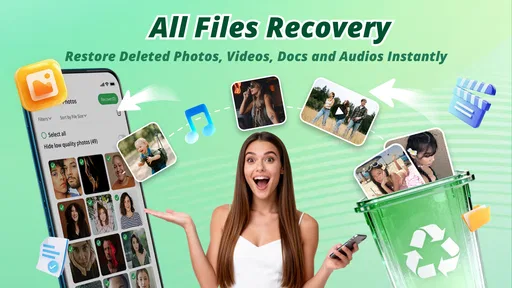
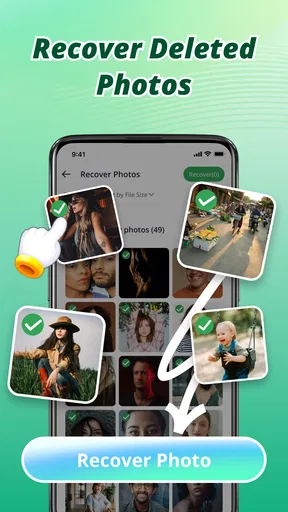



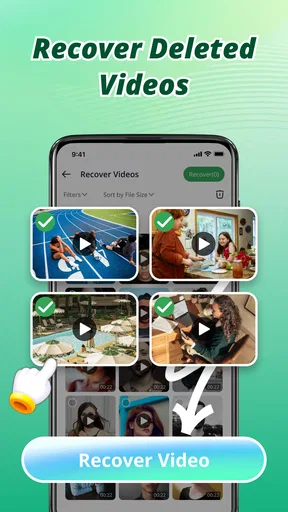
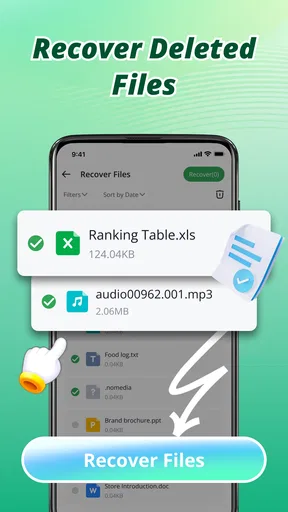

 Analysis by AppCompare
Recovering a deleted file is stressful partly because you rarely know what to do next. Should you keep searching, try another tool, or stop using the device? Recovery Photo - File Restore is aimed at making that first step feel approachable: it is a free productivity app from AbCdE, with a simple recovery-focused purpose. I find that focus appealing, though I would treat any recovery tool as a possible helper rather than a replacement for regular backups.
Finding your way without a technical detour
The published review of the app describes a clean, straightforward interface, and that kind of simplicity matters most when someone is already worried about a missing file. Clear choices and a short route into a scan can reduce the amount of reading and decision-making needed. The app has a 4.2 average from around 1.2 thousand ratings, but a rating cannot tell me whether it will find a particular file on a particular device; recovery results depend on the situation.
For a first-time user, I would approach the scan with one goal in mind rather than trying to recover everything at once. If a photo has gone missing, look for that item first; if a work document is the priority, keep the search focused there. A preview, when available, can help distinguish the file you need from similarly named or visually similar results. This is a useful safeguard before restoring anything, especially when a long list makes it easy to tap the wrong item.
Comfort, control, and the limits of a simple screen
A direct interface can help people who prefer fewer steps, but ease of navigation is not the same as support for every access need. People with low vision may need larger text or stronger contrast than an app provides, while users who rely on screen readers may need controls and results to be announced clearly. I would check those basics on the device before depending on the app for an urgent recovery task.
There is also a motor-control angle: a recovery list can involve repeated taps, scrolling, and careful selection. If those actions are difficult, previewing one candidate at a time and pausing between steps may be more comfortable than rushing through a large result set. I would avoid treating a quick scan as a reason to hurry. The important thing is selecting the right file, not finishing first.
When a recovery app fits—and when it does not
This tool makes the most sense when a file has recently disappeared and you want a simple place to start. Imagine deleting a photo while clearing space, then realizing later that it was the only copy of a useful receipt or family moment. A focused scan can be less intimidating than searching through folders manually, and filtering by file type can help narrow the task. If the file is important, though, I would also check the device’s built-in trash or recently deleted area and any backup service already in use. Those options may be the safer or more direct route.
That comparison is worth keeping in mind: built-in recovery folders are usually the first stop for a recent deletion, while a backup is the stronger option when a file was saved before it vanished. A dedicated recovery app is a different kind of attempt, not a guarantee that it can reverse every deletion. If the file is irreplaceable, I would avoid creating or downloading lots of new files while deciding what to do; continued device use can make a recovery attempt less promising on some systems.
Worth Reading Before You Choose

EA SPORTS FC Mobile 26 Is a Bigger Football Game, but It Takes Time

Flipboard Shows What News Apps Must Do Beyond the Feed

Switching to Android Auto Means Rethinking Your Driving Routine

Google Calendar Makes a Crowded Week Easier to Manage

Ludo King Makes the Most of the Minutes Between Plans

Baby Panda World Brings Quick Play to Modern Phones, but Its Game Library Feels Busy
Practical expectations before you scan
People often ask whether an app like this can recover anything, whether it works offline, or whether every scan result is safe to restore. I would not assume that every deleted item is recoverable or that a scan result is necessarily the original file. Check previews and file details carefully, and save anything you do restore somewhere sensible. If the missing item is essential, a trusted backup or professional help may be a better next step than repeated experiments.
It is also sensible to consider privacy before scanning. Photos and documents can be personal, so I would use the app only on a device I control and read the permissions and privacy information shown on the device’s store page before proceeding. For someone helping a family member, explaining what the scan will do and letting them choose what to restore is a small but important way to keep the process respectful.
Who will get the most from it
I can see this being useful for someone who wants a simple, free first attempt and is comfortable reviewing a list of possible files. It is less suitable for anyone expecting guaranteed recovery, needing advanced repair tools, or relying on specific accessibility controls without first checking that they work on their device. The Everyone age classification makes it broadly accessible by age, but it does not answer questions about visual, motor, or screen-reader support.
The app is version 1.7 and has more than 100 thousand installs. It was released on April 10, 2026, and its minimum operating-system requirement is version 7.0. Those details make it easier to judge whether it is worth considering for a device, but they do not change the basic advice: keep backups for important files, and treat recovery as a fallback rather than a routine storage plan.
So, if you’re looking for a reliable way to recover lost files, give this app a shot. It might just become your new best friend in the world of file recovery.
First Impressions: A User-Friendly Interface
Right off the bat, Recovery Photo - File Restore impresses with its clean and intuitive interface. You don't need to be a tech wizard to navigate through it. The app is designed to be straightforward, which is a huge plus for those of us who just want to get our files back without jumping through hoops. The main screen greets you with simple options to start the recovery process, and honestly, it's as easy as pie.
How It Works: The Magic Behind the Curtain
So, how does this magical recovery happen? Once you fire up the app, it scans your device for any recoverable files. This includes photos, documents, and even videos. The scanning process is surprisingly fast, and you can sit back with a cup of coffee while it does its thing. The app categorizes files neatly, which helps in finding what you’re specifically looking for. Whether it's that vacation photo from last summer or a critical work document, it’s all there at your fingertips.
Performance: Quick and Efficient
One of the aspects that really stood out to me was the speed and efficiency of the recovery process. Recovery Photo - File Restore doesn’t just retrieve files, it does so quickly without compromising on quality. The recovered photos retained their original resolution, and the documents were just as they were before the accidental deletion. It’s like turning back time, and who wouldn't want that superpower?
Features: More Than Just Recovery
While the main function of the app is recovery, it packs a few more handy features. You can preview the files before restoring them, which is a lifesaver if you’re unsure of what exactly you're looking for. There’s also an option to filter the files by type, date, or size. This is particularly useful when you’re dealing with a large number of files and need to zero in on specific ones quickly.
Compatibility and Accessibility
The app is available for both Android and iOS, making it accessible to a wide range of users. I tested it on both platforms, and it worked seamlessly without any hiccups. Plus, the app supports multiple languages, so it’s user-friendly for a global audience. Whether you're a tech newbie or a seasoned pro, you'll find the app easy to use on any device.
Final Thoughts: A Reliable Companion for Your Files
In the age of digital everything, losing files can feel like a mini-crisis. But with Recovery Photo - File Restore, those fears can be put to rest. It’s efficient, user-friendly, and does exactly what it promises. Whether you’re prone to accidental deletions or just want peace of mind, this app is definitely worth having in your digital toolkit.
My inclusive verdict: I like the idea of a recovery tool that keeps the first steps approachable, especially for someone who does not want to learn a complicated file manager in the middle of a stressful moment. The app’s 30 reviews add some written feedback alongside its broader rating, but I would still test it with a non-urgent need before counting on it in a crisis. Its strongest case is as an accessible starting point for a straightforward recovery attempt; its weakest is as a substitute for backups, device-specific support, or specialist recovery when the file truly cannot be replaced.
So, if you’re looking for a reliable way to recover lost files, give this app a shot. It might just become your new best friend in the world of file recovery.
Pros
- Easy-to-navigate user interface.
- Recovers photos from SD cards.
- Supports multiple file formats.
- Offers preview before recovery.
- No root required for recovery.
Cons
- Some files may be unrecoverable.
- Ads can be intrusive at times.
- Limited free version features.
- Takes time for deep scans.
- Requires internet for full functionality.
FAQs for Recovery Photo - File Restore
What is Recovery Photo - File Restore and how does it work?
Recovery Photo - File Restore is an app designed to help you retrieve deleted photos and files from your device. Using advanced scanning algorithms, it searches your device storage for recoverable data. Once the scan is complete, it allows you to preview and restore the files you want to recover, offering a user-friendly interface for easy navigation.
Is Recovery Photo - File Restore safe to use on my device?
Yes, Recovery Photo - File Restore is safe to use. The app has been tested for security and does not contain malware or spyware. It requires specific permissions to access your storage, which are necessary for scanning and recovering data. Always download from official app stores to ensure you're getting a legitimate version.
Can Recovery Photo - File Restore retrieve all types of files?
While Recovery Photo - File Restore primarily focuses on recovering photos, it also supports other file types like documents and videos. However, the success rate may vary depending on how long ago the file was deleted and whether it has been overwritten. It's most effective shortly after file deletion.
Do I need to root my device to use Recovery Photo - File Restore?
No, you don’t need to root your device to use Recovery Photo - File Restore. The app is designed to work on both rooted and non-rooted devices. However, having root access may increase the chances of file recovery by allowing deeper system access, but it is not a requirement.
Is there a cost associated with using Recovery Photo - File Restore?
Recovery Photo - File Restore offers a free version with basic recovery features. For more advanced options, such as recovering a larger number of files or accessing premium support, you might need to purchase a subscription or a one-time upgrade. Check the app details for specific pricing information.


